Connect GitHub
Add RFC 3161 timestamps — qualified (eIDAS) if you choose — and advanced electronic seals to what your GitHub Actions workflows build, optionally post-quantum, with no Sigill keys or secrets stored in GitHub.
Your pipeline already knows what it built. This guide makes that provable: every artifact your workflow submits gets an independent RFC 3161 timestamp or an organisation seal, and Sigill records which repository, commit and workflow run issued it — taken from GitHub's own signed identity token, not from anything the workflow claims.
Configuration lives in GitHub. You install the Sigill app on the repositories you choose; Sigill only records which organisation the installation belongs to. Workflows need no API key and no secrets.
What you get
- No secrets in GitHub. Each job proves who it is with GitHub's OIDC identity token and receives a Sigill credential that lasts 15 minutes and can only timestamp and seal.
- Verified origin. Every timestamp and seal carries an Issued by record: repository, commit, branch or tag, workflow, run and GitHub environment.
- Seals your customers can check. Release assets get an advanced electronic seal (CAdES) — the timestamp embedded, qualified (eIDAS) if you choose, optionally post-quantum hybrid — and the
.p7sis attached to the GitHub release next to the file it covers. - Only digests leave the build. Sigill never receives your files.
- A few lines of YAML. The Sigill Evidence action does the work — and its own releases are sealed with it.
Before you start
- You are an owner of your Sigill organisation.
- You are an admin of the GitHub organisation (or it is your personal account).
- Timestamps work on every plan. Seals need the Business or Scale plan.
Step 1 — Connect your GitHub organisation
Start in Sigill. Open Settings → Apps and click Connect GitHub.
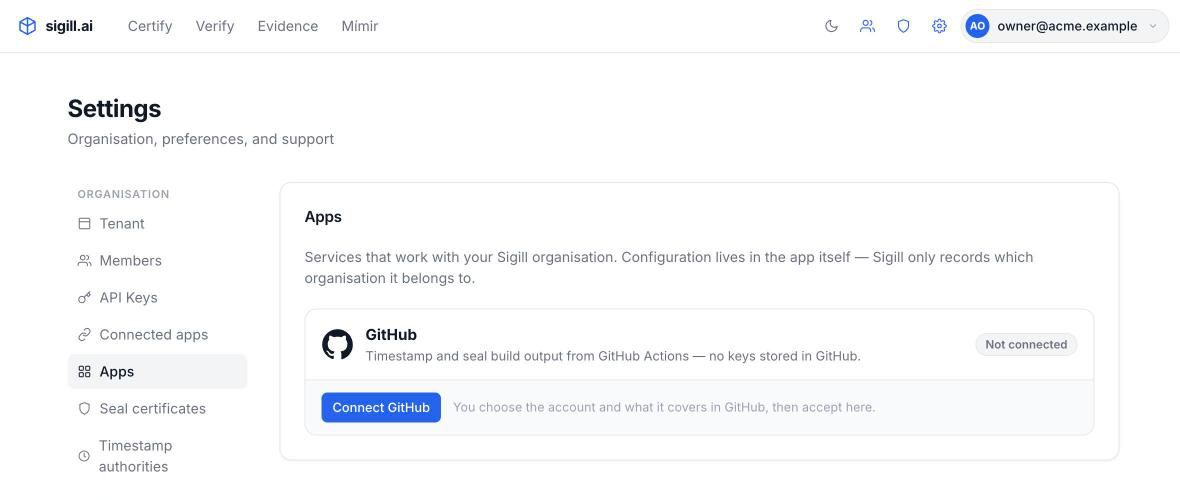
Settings → Apps lists the apps you can connect. Configuration happens in the app itself.
Install the app in GitHub. Choose your organisation, then the repositories that should produce evidence. The app only reads repository metadata and organisation membership — it cannot read your code or change anything.
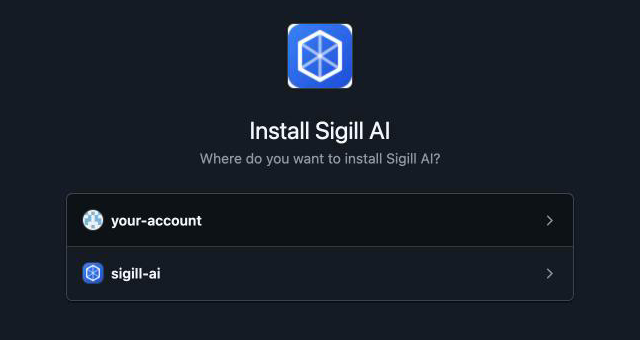
Choose where to install Sigill — your organisation or a personal account.
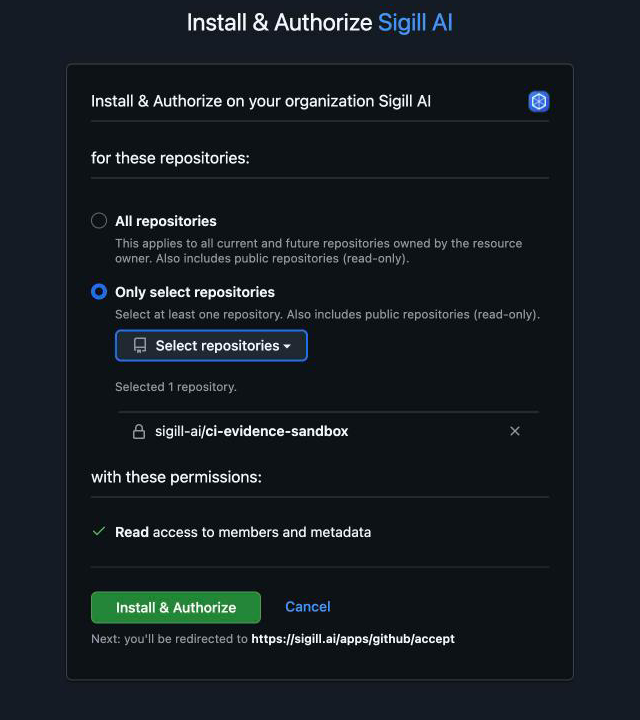
Pick the repositories. You can add or remove repositories in GitHub at any time.
Accept in Sigill. GitHub sends you back to Sigill, which asks GitHub to confirm that you administer the organisation. Review the connection and click Accept.
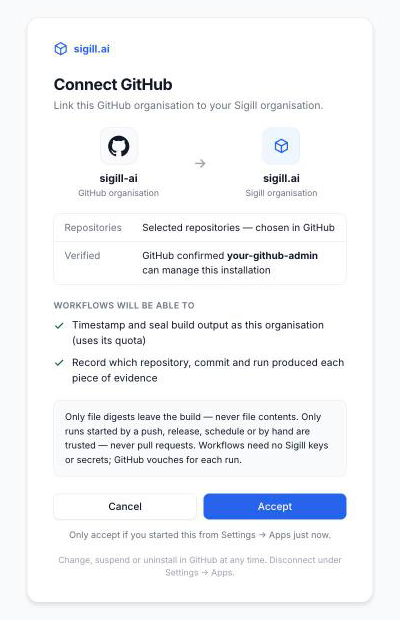
Only accept a connection you started from Settings → Apps yourself.
The connection now appears under Settings → Apps, with its live status from GitHub.
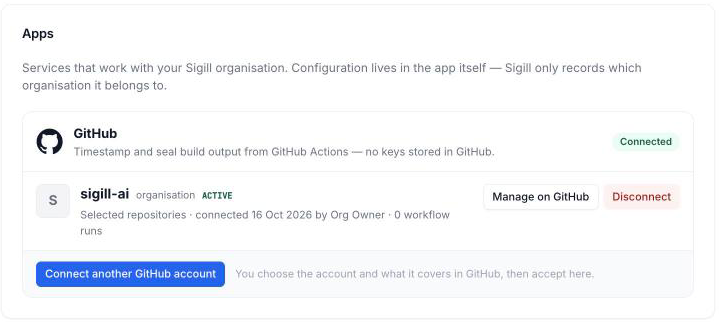
Suspend or uninstall the app in GitHub and Sigill stops accepting its workflows within a minute. Disconnect here at any time.
Step 2 — Timestamp what you build
Add the Sigill Evidence action to a workflow — sigill-ai/evidence-action. The job needs one permission, id-token: write, so it can prove who it is with GitHub's identity token. No secrets, no API key.
name: Build
on:
  push:
    branches: [main]

jobs:
  build:
    runs-on: ubuntu-latest
    permissions:
      id-token: write   # GitHub identity token for Sigill
      contents: read
    steps:
      - uses: actions/checkout@v5
      # … build into dist/ …
      - uses: sigill-ai/evidence-action@v1
        with:
          files: dist/*
Every file in dist/ gets an RFC 3161 timestamp (.tsr) next to it. The action hashes the files on the runner — only the digests are sent to Sigill.
Only runs started by a push, a release, a schedule or by hand (workflow_dispatch) are accepted. Pull-request runs never are — they run code that has not been merged.
Step 3 — Seal your releases
A timestamp proves when the bytes existed. A seal also proves who issued them: an advanced electronic seal with your organisation's certificate (recommended) or the Sigill Platform Seal, with the timestamp embedded. This workflow seals every asset of a published release and attaches each seal (.p7s) to the release, next to the file it covers.
name: Seal release
on:
  release:
    types: [published]

jobs:
  seal:
    runs-on: ubuntu-latest
    environment: release-signing   # recommended: required reviewers before anything is sealed
    permissions:
      id-token: write   # GitHub identity token for Sigill
      contents: write   # attach the .p7s files to the release
    steps:
      - run: gh release download "$GITHUB_REF_NAME" -R "$GITHUB_REPOSITORY" -D assets
        env:
          GH_TOKEN: ${{ github.token }}
      - uses: sigill-ai/evidence-action@v1
        with:
          files: assets/*
          mode: seal
          attach-to-release: true
          # certificate: <id>   # Settings → Seal certificates → Copy ID
          # pqc: true           # add a post-quantum ML-DSA-87 signature (hybrid seal)
Two options choose how it seals:
certificate— which certificate seals: its ID from Settings → Seal certificates → Copy ID. Leave it out to use your organisation's only certificate, or the Sigill Platform Seal when you have none of your own.pqc—truemakes it a post-quantum hybrid: an ML-DSA-87 signature strengthens the classic seal, so it stays trustworthy once quantum computers can break classic signatures. Off by default.
Every run lists what it timestamped or sealed in the job summary, with a link to each piece of evidence in Sigill.
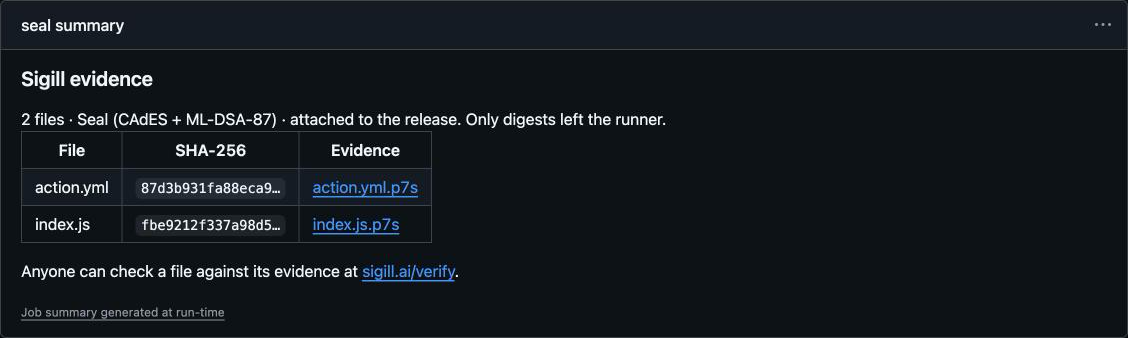
The job summary links every file to its evidence. This is the action sealing its own release.
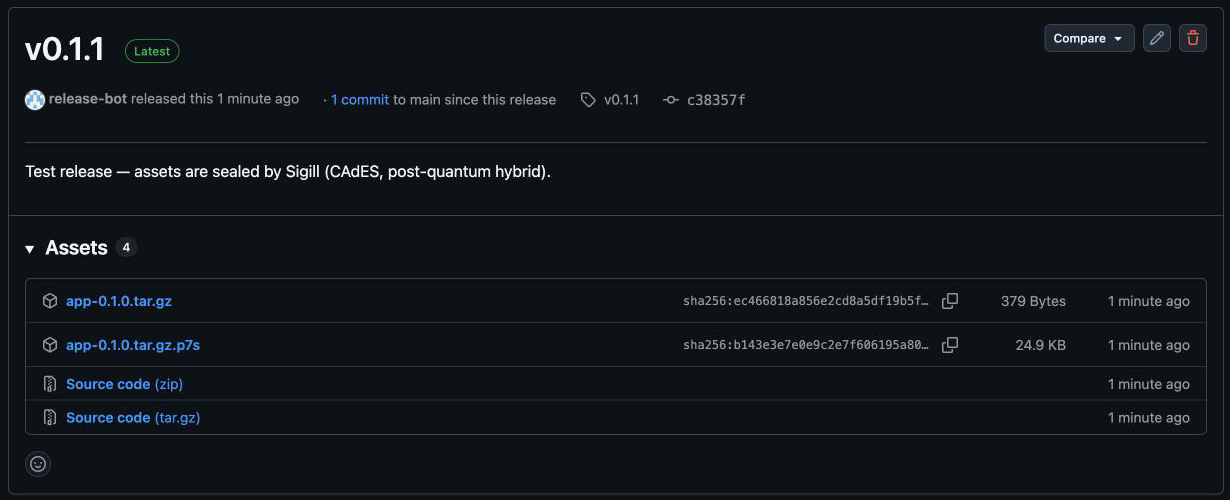
Each asset ships with its seal. Anyone who downloads the release can verify it — without a Sigill account.
Step 4 — See and verify the evidence
Every timestamp and seal appears in your Evidence Store. The preview and the evidence page show Issued by — the repository, commit, branch or tag, workflow, run and GitHub environment that requested it.
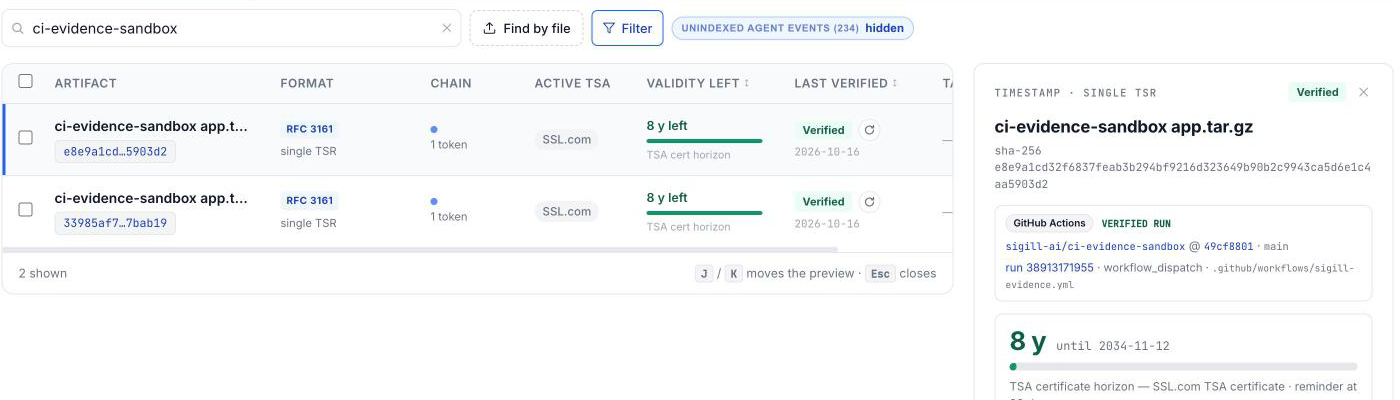
Search by repository or file name; the preview shows the verified run.
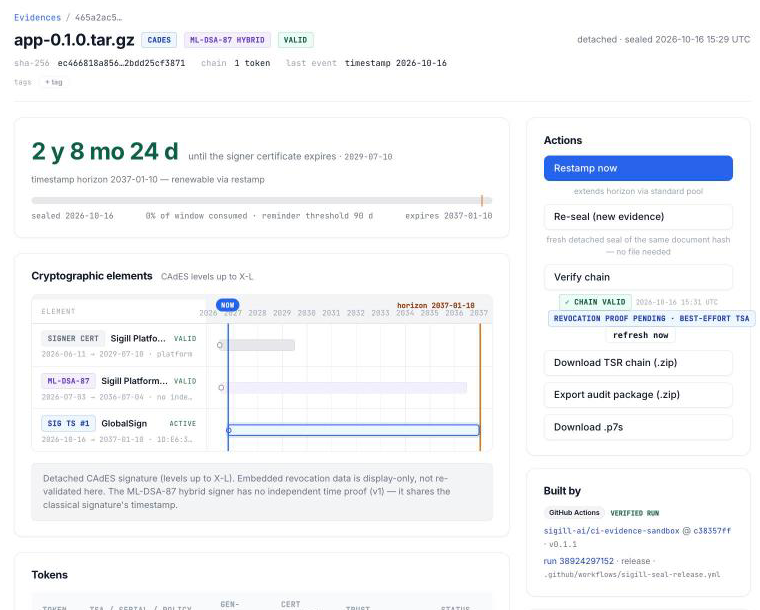
A sealed release asset: CAdES with an embedded timestamp, a post-quantum ML-DSA-87 signature, and the release run that issued it.
To check a sealed asset independently, open sigill.ai/verify, drop the file and upload its .p7s. Verification happens in your browser — the file is not uploaded. Any CAdES validator confirms the classic signature and timestamp; the post-quantum signature needs a validator with ML-DSA support, which sigill.ai/verify has.
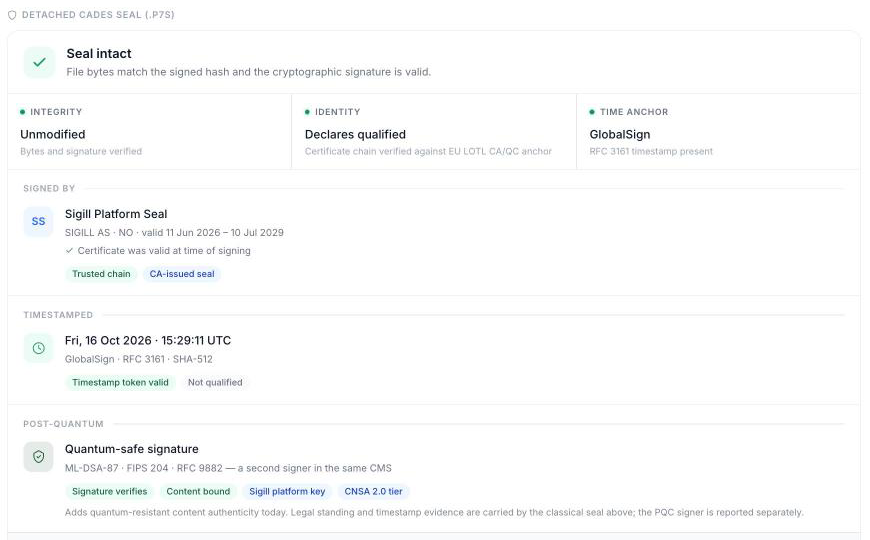
Integrity, signer, timestamp and the post-quantum signature, verified independently.
Whose name is on the seal?
Every Sigill organisation can seal with the Sigill Platform Seal — a quick way to start: Sigill attests that these exact bytes existed at that time, sealed through your organisation's account.
When customers, auditors or regulators should see your organisation behind a release, seal with your own organisation certificate (Settings → Seal certificates). The seal then identifies your organisation as the issuer. Treat that certificate like any signing key: run the sealing job in a GitHub environment with required reviewers, so nothing is sealed in your organisation's name without an approval.
What the evidence proves
- That these exact bytes existed at the timestamp's time — and, for a seal, that your organisation (or the Sigill Platform Seal) issued them.
- Which run asked for it. Repository, commit, branch or tag, workflow, run and environment come from GitHub's signed identity token, so a workflow cannot claim to be another repository or run.
It does not, on its own, prove how the bytes were built: the workflow chooses what it hashes. To show that an artifact was built from a given commit, add GitHub artifact attestations (SLSA build provenance) to the same workflow. Sigill timestamps and seals what the workflow submits — artifacts it does not submit are not covered.
Who can issue evidence?
Anyone who can run a trusted workflow — push, release, schedule or manual — in a repository the app covers can issue evidence as your organisation. That is the same reach as an API key stored in the repository's secrets, without the key. Control it where you already control your code:
- Install the app only on repositories that should produce evidence.
- Use branch protection for who can push.
- Put sealing jobs behind an environment with required reviewers.
Troubleshooting
github_not_connected— the repository's GitHub organisation is not connected to a Sigill organisation. An owner connects it under Settings → Apps.repository_not_covered— the app is not installed on this repository, or the installation is suspended. Add the repository in GitHub (Settings → GitHub Apps → Sigill AI → Configure).event_not_trusted— the run was triggered by a pull request or another event that is not accepted. Run on push, release, schedule orworkflow_dispatch.certificate_required— your organisation has several seal certificates. SetSIGILL_CERTIFICATEto the one that should seal.- HTTP 403 with an HTML page — the request was blocked before it reached Sigill. If you call the API yourself instead of using the action, send the GitHub token as
Authorization: Beareron the token exchange. - HTTP 402 — sealing needs the Business or Scale plan.
Reference
- The action: inputs, outputs and examples in sigill-ai/evidence-action. Its releases carry their own seals — check
dist/index.jsandaction.ymlat a release tag against the.p7sfiles on that release at sigill.ai/verify. - Without the action (another CI system, or your own script): the token exchange, request bodies and every error code are in the API reference → GitHub Actions API.
- Privacy: what the app can access and what Sigill stores — GitHub App privacy policy.