Timestamp every AI conversation from your browser
Most AI usage does not happen through an SDK.
It happens in a browser tab.
You ask ChatGPT a question. Claude writes a contract draft. Gemini summarises a document. Months later, someone asks a simple question: can you prove that this is what the model actually said?
If the conversation happened through your own code, Sigill's SDKs and agents already solve that problem. If it happened in a browser, they don't.
Today we are releasing a browser extension that closes that gap.
The extension creates evidence before anyone knows it will matter. That is the only moment it can be created.
What it does
Every time a conversation turn completes — your prompt, the model's response — the extension captures both, builds an AiEvidenceEnvelopeV1, hashes it, and submits the hash to an RFC 3161 Timestamp Authority. The timestamp token comes back and is stored locally in your browser alongside the full envelope.
A small shield badge appears in the response action bar when a turn is successfully stamped. Hovering it shows the evidence ID, the exact timestamp, and the name of the TSA that signed it.
Your conversation text never leaves the browser. The TSA receives a 64-character hex digest. The hash proves the conversation existed without revealing what was in it.
The evidence represents what was presented to the user in the browser at a specific point in time, not an internal provider-side conversation export.
Why this matters beyond AI conversations
AI conversations are the first adapter. But the browser is where a much broader category of consequential records is encountered.
Employment agreements signed through online portals. Termination notices received by email. Rental contracts opened in a browser PDF viewer. Offer letters, policy documents, invoices. These are records where what you saw — and when you saw it — can become directly relevant later.
The pattern is the same regardless of content type. You open something in the browser. At that moment, a specific version exists. Later, it may be claimed the document was different, that you saw an earlier draft, or that you did not see it at all. Evidence created at the time of viewing, bound to the exact bytes, settles that question with proof rather than memory.
AI conversations are where we start. Documents are where this goes.
The technical path
The extension does five things per turn:
- Capture the prompt and response from the page.
- Build an evidence envelope with platform, model provider, conversation ID, and your Sigill identity.
- Canonicalise the envelope to RFC 8785 bytes and compute a SHA-256 hash.
- Submit only the hash for RFC 3161 timestamping via
POST /tsa/stamp-hash. - Store the sealed envelope — with the timestamp token attached — in local browser storage.
The hash that reaches Sigill's API is identical in format to any other stamp call. The same code path, the same quota, the same audit trail on your account.
The extension uses a MutationObserver to detect when streaming has finished and a debounced timer to confirm the response is stable before stamping. The DOM adapters for each platform are isolated content scripts — Claude, ChatGPT, and Gemini each have a thin adapter that finds the right elements, with shared stamp logic doing the cryptographic work.
What the envelope contains
A timestamp alone answers when. The envelope answers who, what, where, and with which model — and binds all of it to the same hash that was submitted to the TSA.
This is what a sealed envelope looks like, drawn from a real conversation:
{
  "schemaName": "AiEvidenceEnvelope",
  "schemaVersion": "1",
  "evidenceId": "6da00944-ead3-4159-ae41-93a4add75e51",
  "createdAt": "2026-06-21T11:08:18Z",

  "purpose": {
    "category": "chat.completion"
  },

  "actor": {
    "type": "user",
    "id": "raymond@sigill.ai",
    "tenantId": "f47ac10b-58cc-4372-a567-0e02b2c3d479"
  },

  "activity": {
    "name": "chat.completion",
    "correlationId": "6a37c5bf-1cc0-83eb-b77f-23c1473e8816"
  },

  "model": {
    "provider": "openai",
    "name": "gpt"
  },

  "prompt": {
    "contentType": "text/plain",
    "encoding": "utf-8",
    "inline": "Can you review this contract and flag any unusual clauses?"
  },

  "output": {
    "contentType": "text/plain",
    "encoding": "utf-8",
    "inline": "I reviewed the contract. Clause 12.3 contains an automatic renewal..."
  },

  "integrity": {
    "canonicalization": "RFC8785",
    "envelopeHash": {
      "alg": "SHA-256",
      "hex": "25ec61459982479094b968bf492572d278545a6e7dc82e8501bb8c959b711960"
    }
  },

  "proofs": [{
    "type": "rfc3161",
    "tsaName": "Microsoft",
    "genTime": "2026-06-21T11:08:19.11Z",
    "serial": "116776671004617",
    "tsrBase64": "MIIUrDA..."
  }]
}
Each field is deliberate:
evidenceId — a UUID generated locally per turn, before the stamp is requested. Uniquely identifies this record independent of any server.
actor — who ran the conversation. The id is your email, tenantId is your organisation's UUID from Sigill. Both are resolved from your session when the extension detects you are signed in.
activity.correlationId — the conversation ID extracted from the page URL. Lets you link multiple turns in the same conversation back to a single thread.
model.provider — derived from the platform. The specific model version is not exposed by the DOM and is currently omitted.
prompt and output — the full text of both sides of the turn, stored inline. These are what get canonicalised and hashed.
integrity.envelopeHash — the SHA-256 hash of the RFC 8785 canonical form of the envelope, excluding the hash field itself and the proofs. This is the exact value submitted to the TSA.
proofs[0].tsrBase64 — the RFC 3161 timestamp response from the TSA, in full. Contains the TSA's signed assertion that the hash existed at genTime, signed with their certificate. Independently verifiable with standard tooling — no Sigill account required.
The envelope is the same schema produced by the Python and .NET SDKs. A record created by the browser extension verifies with the same tools as a record created in a pipeline.
Identity
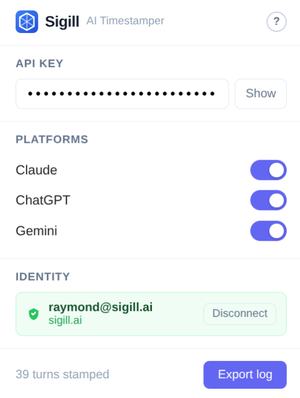
If you are signed in to sigill.ai in the same browser, the extension picks up your identity automatically. It reads your session, decodes the JWT claims, and fetches your account details to include in the envelope's actor field. The identity appears in the extension popup and is included in every subsequent stamp.
If you are not signed in, timestamps still work. The actor field is omitted, but the hash is stamped and the proof is identical. The timestamps are independent of the actor claim.
What's standard, what's Sigill
The cryptographic primitive is not proprietary.
RFC 3161 timestamping has existed for decades. Any application capable of computing a SHA-256 hash can submit that hash to a Timestamp Authority and receive a signed timestamp token. You could build a browser extension that performs that workflow directly against a public TSA.
What Sigill adds is the evidence model around it: canonical AI evidence envelopes, actor attribution, local storage of sealed records, export in a consistent format, and the same RFC 3161 workflow already used by the SDKs, MCP server, and CI integrations. A timestamp produced by the extension can be verified by anyone with the envelope — no Sigill account required.
The timestamp itself remains independently verifiable.
Supported platforms
The current release supports Chrome (Manifest V3) on Claude, ChatGPT, and Gemini. Each platform has its own content script adapter. All three share the same stamp and storage logic.
What's not in this release
Firefox. The extension will likely work with minor changes, but we have not tested it and are not distributing it yet.
Chrome Web Store. Update: the extension is now on the Chrome Web Store — the official (and only) distribution channel, with automatic updates.
Automatic re-timestamping on edits. If you edit a previous message and the model regenerates a response, the new turn is stamped as a separate envelope. The original stamp remains valid for the original response.
Where this goes
Right now: browser → AI conversation → timestamp.
The roadmap we are working toward extends that to everything consequential you view in a browser:
Selective page and document stamping. A right-click or toolbar action to timestamp the current page or a specific file while viewing it. Hash the rendered content or the raw file bytes, same RFC 3161 path.
PDF and file viewing. Stamp PDFs opened directly in the browser — through the browser's built-in viewer or document-handling portals — at the moment you open them.
Signing workflows. When reviewing a document before signing it, timestamping what you saw creates a clear chain from review to signature. The extension could detect common signing surfaces and offer to timestamp the document as part of the review step.
Firefox and Safari. The current release is Chrome only. Both are on the list.
At that point the value proposition becomes broader than AI evidence: independent proof for anything you see in a browser, created before anyone knows it will matter.
Installation
Add the extension from the Chrome Web Store. (This post originally described a manual zip install used before the store listing existed — the store is now the official channel.)
Add your API key in the extension popup. Your key is available under Settings → API Keys.
Feedback
This is a public beta and we are actively looking for input. If the extension misses a turn, places the badge in the wrong spot, or fails silently on a platform you use — we want to know. If there is a document type or workflow where timestamps would matter, that is exactly what should shape the roadmap.
Reach us at contact@sigill.ai.
The extension is in public beta. Source will be published on GitHub at Web Store launch.